Operation Bundle of Wires  

Going Haywire

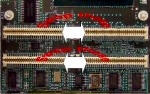
Figure 1: Affected connectors.
Oops!  Somebody goofed.  Happens all the time.

Simple mistakes are magnified on complex, expensive assemblies.  A simple routing miscommunication resulted in a significant problem for a customer.  Here's what the board was originally supposed to look like (see Figure 1).

Here's how it was manufactured (see Figure 2).

The signals on connector 1 were supposed to go to location 2 and vice versa.  The same for connectors 3 and 4. 

Figure 2: The problem of incorrect circuit routing. The connectors need to be swapped as indicated.

Figure 3 shows this location's mating connectors in place.  If the board connectors are not rewired and this mating daughter board is plugged in as pictured above, sparks will fly! Something has to be done.  Time is of the essence and for this is one valuable board, scrapping and re-manufacture are not viable options.

There are a number of different alternatives to consider.  For instance, engineers could make (and place on top of the locations) an interposer (adapter) card that rewires everything to the proper terminations.  That process would result in the connectors

Figure 3: Daughter card mounted.
sitting on the interposer board and the interposing cards sitting on the board as leadless chip carriers (LCCs) or BGAs.  Man that's a lot of engineering to make a densely packed adapter board - swapping the connections back and forth would be tight.  The time and money to make and place a handful of these boards could be prohibitive.  Additionally, the connections of the adapter / interposer board will endure the daughter card being plugged and unplugged a number of times, putting frightful stress on the interposer to mother board solder connections.  The connector is also constrained by a height specification; the modified connector top can not be more than .040" higher than the original configuration. In its barest terms, "Customer no like interposer / adapter card idea.  Customer demands a wiring solution due to timeframe and working environment.  Vendor must comply.  Yassuh!"

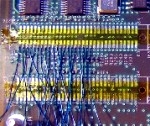
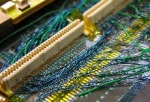
Figure 4. Wiring begins.
We can all understand that.  OK so what does that mean in concrete terms?  64 pins per connector, 4 connectors. 256 wires and 1 millimeter spacing. That's a lot of wire and fiddling in a tight space, no wonder they called it haywire in the old days.   How can we get all the copper and insulation into that space without shorting the wires to each other, shorting wires to the wrong pads or connector pins?  Well, let's break it down and see how it can be done. 

Figure 5: Wiring oganizational challenge.
We'll use the smallest possible wires in order to fit as many as we can in the tight space.  Some of the connections require more current carrying capacity than others, but by and large we are able to use small 34 gauge wires.  Figures 4 and 5 provide a good view of the mass of wires being put in place.  

Once the wires are laid down on the board we want to begin the connector-to-pad wire attachment.  A couple of precautions will save headaches down the line.  It's important to ensure the connectors are in perfect alignment with the mating daughter card when the wiring is complete. 

Figure 6. Connectors being placed for routing.
 At the same time we want to isolate the bottom of the connector pins from their old pad connections so there is no unintentional shorting when the daughter board presses down on the reworked arrangement.  To assist in this effort, .005" FR-4 spacers are cut to the shape of the connector bodys, tacked flat to the board so they do not interfere with the connectors' locating nubs, keeping the connectors level and within the height specification.  The "nubs" are the little projections on the bottom ends of the connector that fit into precisely located holes on the mother board.  The .005" spacer provides just enough height to ensure isolation but leaves enough of the nub in contact with the board to allow us to keep the connectors "on center".

Figure 7: Wiring complete, connectors in place.
 So now the pads are wired and the connectors are put in place.  The connectors themselves are "tacked" in place with flexible temporary adhesive to permit slight adjustment of the connector during the early stages of the wiring.  This allows the technician maximum flexibility to correct any missteps in a complicated process.  That complete, the technician begins to wire the pads to the proper connector.  Each side of each connector's wiring is inspected as it is completed in order to prevent the inspector from committing suicide while attempting to inspect the final rat's nest all in one fell swoop.

Figures 6 and 7 show the connectors wired to the board.  

Once the connectors are wired and inspected, the connectors are secured to the board using a variety of permissible adhesives which are strong but will also permit further rework of the location, if required.  These are engineering boards after all!

Figure 8: Rework complete, daughter card in place.
Figure 8 is the final rework with the daughter board in place. 

Piece of cake, can of corn, no problem!  (Just don't tell that to the technician who slaved over this thing for two days.)


Several members of the Circuit Technology Center team contributed to this feature story.