7.4.2 Soldering Surface Mount J Lead Components, Continuous Flow Method
Outline
This procedure covers the general guidelines for soldering surface mount J lead components. There is basically only one style of J lead component. Whether leads are on two sides or four sides, or whether the component is large or small, the soldering principles are the same.
Minimum Skill Level - Intermediate
Recommended for technicians with skills in basic soldering and component rework, but may be inexperienced in general repair/rework procedures.
Conformance Level - High
This procedure most closely duplicates the physical characteristics of the original, and most probably complies with all the functional, environmental and serviceability factors.
Soldering Skills Practice Kit
Training kit to practice circuit board soldering skills prior to testing for certification.
Precision Tool Set
Nine precision-crafted tools for detailed circuit board work.
Additional Items and Supplies
Cleaner
General purpose cleaner for removing contamination.
Microscope
Precision microscope with stand and lighting for work and inspection.
Soldering Iron
Properly maintained soldering iron and properly sized soldering iron tips.
Wipes
Nonabrasive, low-linting wipes for cleanup.
Images and Figures
Surface Mount J Lead ComponentFigure
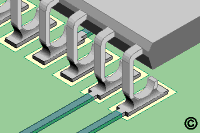
Figure 1: Place component and check alignment.
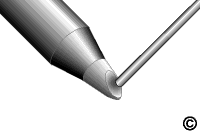
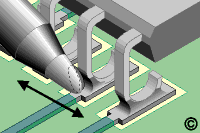
Figure 2: Apply solder to the continuous flow solder tip to create a convex bead of molten solder.
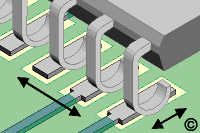
Figure 3: Slowly move the tip over the row of leads to form proper solder fillets at each joint.
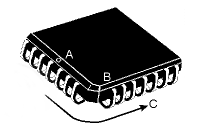
Figure 4:A - Dot indicates pin 1 B - Indicates pin 5 C - Indicates direction of pin count.
Procedure
Add liquid flux to the corner pads.
Place the component in position and hold it steady. The leads must be aligned with the pads. On large components, this is best done by aligning the leads on opposite corners. (See Figure 1)
Place the soldering iron tip at the junction between the pad and component lead at one of the corners. Apply additional solder as needed.
Remove the tip. Wait a moment for the solder to solidify before soldering the opposite corner.
Apply solder to the continuous flow solder tip to create a convex bead of molten solder on the tip. (See Figure 2)
Position the solder tip so that the solder bead contacts the vertical portion of the J leads. Slowly move the tip over the row of leads to form proper solder fillets at each joint. (See Figure 3)
Repeat steps 5 and 6 for the remaining sides.
Clean, if required, and inspect.
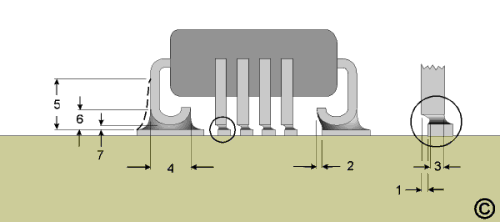
Solder Joint Acceptable Criteria - J Lead Components
Feature
Dim
Class 1
Class 2
Class 3
Maximum Lead Side Overhang
1
No more than 50% of the lead width.
No more than 50% of the lead width.
No more than 25% of the lead width.
Maximum Lead Toe Overhang
2
Not specified.
Not specified.
Not specified.
Minimum Lead End Joint Width
3
50% of the lead width.
50% of the lead width.
75% of the lead width.
Minimum Side Joint Length
4
Evidence of proper wetting.
Side joint length must exceed 150% of the lead width.
Side joint length must exceed 150% of the lead width.
Maximum Fillet Height
5
No maximum, but solder must not touch the component package body.
No maximum, but solder must not touch the component package body.
No maximum, but solder must not touch the component package body.
Mininimum Heel Fillet Height
6
Equal to the solder thickness plus 50% of the lead thickness.
Equal to the solder thickness plus the lead thickness.
Equal to the solder thickness plus the lead thickness.